This guide explains how to migrate your $LVN tokens from Osmosis to the Cosmos Hub and convert them to $RUJI.
Levana users can skip the first step of the Merge, “IBC to Cosmos,” since that step involves transferring assets from the Kujira network to the Cosmos Hub. Instead, they should send their $LVN directly from the Osmosis network to the Cosmos Hub.
To convert your $LVN tokens to $RUJI, follow the steps outlined below:
(Optional) Buy $ATOM to transact on the Cosmos Hub Chain.
IBC $LVN from Osmosis to Cosmos Hub.
Convert your $LVN to $RUJI.
⚡️(Optional) Buy $ATOM to Transact on the Cosmos Hub Chain
For the second step and third step of the Merge, you will need to pay gas fees to do a transaction. If you already own $ATOM on the Cosmos Hub, you can skip this step.
Follow These Steps to Buy and Transfer $ATOM
Go tohttps://app.osmosis.zone/ and connect your Keplr wallet in the top right corner.
At the “from” section search for LVN and enter 100 as the amount and at the “To” section ATOM. The system will automatically calculate the equivalent dollar value in $ATOM.
Click “Swap” then “Confirm”, and then approve the transaction in the Keplr wallet extension window that pops up.
Send $ATOM to the Cosmos Hub
Go to “Portfolio”, search $ATOM and press “Withdraw”.
Choose Network: Cosmos Hub and approve the connection.
For the Amount, press “Max”.
Click “Review Withdraw”, press “Confirm” and approve the Keplr message.
⚡️(Optional) Buy $RUNE to Transact on THORChain
To perform transactions on THORChain, you’ll need $RUNE to pay for gas fees. If you already own $RUNE on THORChain, you can skip this step.
Follow These Steps to Buy $RUNE
Go to https://rujira.network/swap/ and connect your Keplr in the top right corner.
Select “from” token $ATOM on Cosmos Hub and “to” token $RUNE on THORChain.
For $ATOM, fill in Amount 0.1. The system will automatically calculate the equivalent dollar value in $RUNE.
Click “Initiate Swap” and approve the transaction in your Keplr Wallet.
⚡️IBC $LVN from Osmosis to Cosmos Hub
Levana users need to IBC their tokens from the Osmosis network to the Cosmos Hub. You can do that by following these steps:
Go tohttps://app.osmosis.zone/ and connect your Keplr wallet in the top right corner.
Go to “Portfolio”, search $LVN and press “Withdraw”.
Choose Network: Cosmos Hub and approve the connection.
For the Amount, press “Max”.
Click “Review Withdraw”, press “Confirm” and approve the Keplr message.
⚡️Convert Your $LVN to $RUJI
To convert your $LVN on the Cosmos Hub to $RUJI on the THORChain network, follow the steps below. Since your $LVN is already on Cosmos Hub, you can deposit from there.
Send $LVN to Rujira and Deposit KUJI to merge to RUJI
Both sending LVN from Cosmos Hub to Rujira and depositing LVN in the RUJI merge contract are done via the same interface. In our example we assume that you haven’t sent any assets to Rujira yet, nor merged.
- Enter the amount of LVN you have on Cosmos Hub and leave a bit of ATOM for gas fees. The button will tell you to “Deposit LVN to Merge to RUJI”.
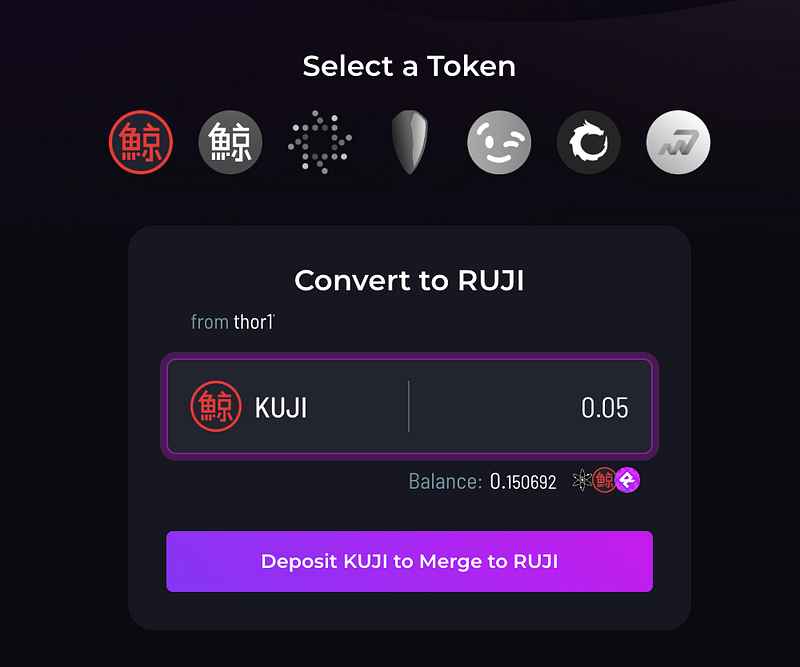
- Next step is to deposit LVN from Cosmos Hub to Rujira.
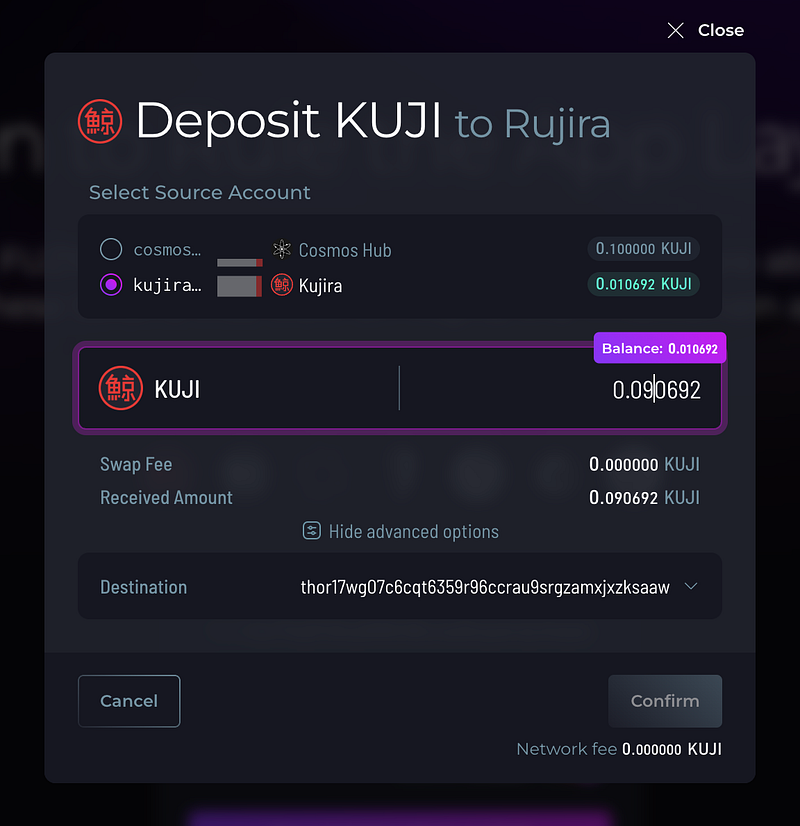
- After depositing LVN from Cosmos Hub to Rujira, you should see the LVN amount that arrive on Rujira.
- Select the LVN amount on Rujira and click Merge to RUJI.
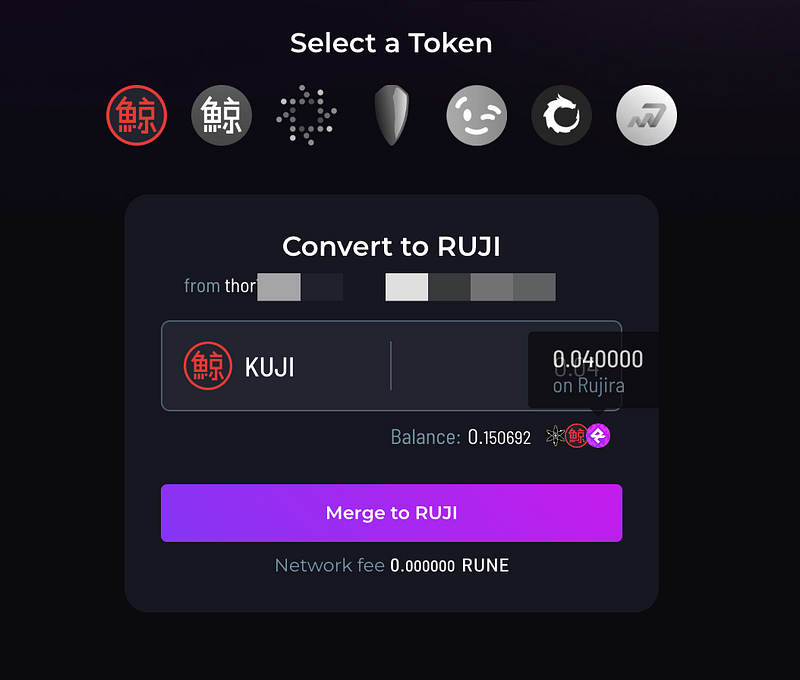
That’s it. Your LVN is now merged in the RUJI merge contract!
⚡️Claiming Your $RUJI Tokens
You will be able to claim your $RUJI on Token Generation Event (TGE) day, which will be announced at a later date. Once $RUJI is live, you can partially or fully claim your tokens on rujira.network/merge. For now, gas fees for interacting with the App Layer are set to 0, so you can claim your tokens and explore the ecosystem without paying any gas.
You have a few options for how to use your $RUJI:
- Keep your tokens locked in the Merge contract and earn bonus tokens.
- Unlock your tokens, start staking, and earn USDC rewards from protocol fees.
- Unlock your tokens and use them within RUJI products.
Keep in mind that withdrawing from the Merge contract is a one-way bridge, meaning you won’t be able to deposit your tokens back in.
Stay updated on the TGE by following announcements from the Rujira X main account.
⚡️Questions and Help
We understand that some parts of the Merge are difficult, and that issues can arise. If you need support with the Merge, please join our official Telegram chat (https://t.me/Rujira_Community) and we will help you with any question you have. In our official Telegram chat, make sure to only interact with team members and admins (with a tag in their name), and never answer to any DM’s. None of the team members and admins will DM you first, so anyone who does is most likely a scammer.
We also want to emphasize that all official updates, links, and announcements will come exclusively from the official Rujira X account. Any other sources claiming to provide guidance, links, or assistance are most likely scams. We urge you to stay vigilant and avoid engaging with unverified actors.

Related articles
![Rujira banner titled Open Data for Fair Finance, with a purple analytics chart showing rising bars and a growth line.]()
Aug. 20, 2026
Rujira Analytics: Open Data for Open and Fair Finance
- App-Layer
![Rujira banner titled Bringing Crypto Back to Its Roots, with an abstract purple tree growing across a dark background.]()
Aug. 12, 2026
Bringing Crypto Back to Its Roots
- App-Layer
![Rujira banner announcing the expansion of RUJI Money Market with 5 new lending vaults, 4 new assets to borrow, and 3 new collateral assets.]()
Aug. 5, 2026
RUJI Money Market Expands with New Lending and Borrowing Markets
- App-Layer
![Rujira banner announcing 18 new trading pairs on RUJI Trade with abstract purple liquidity routes.]()
Aug. 5, 2026
18 New Trading Pairs Are Now Live on RUJI Trade
- App-Layer
![Rujira banner announcing multi-collateral borrowing in RUJI Money Market.]()
Jul. 30, 2026
Multi-Collateral Borrowing Is Live on RUJI Money Market
- App-Layer
![Rujira overview showing native-asset trading, automated trading, lending, borrowing, and liquidations built on THORChain.]()
Jul. 28, 2026
THORChain and Rujira: A Shared Foundation for Omnichain DeFi
- App-Layer
![Rujira graphic introducing RUJI Money Market as a system for lending, borrowing, and bidding on liquidations.]()
Jul. 23, 2026
How RUJI Money Market Connects Lending, Borrowing, and Liquidations
- App-Layer
![]()
Feb. 9, 2026
How to Get Started With Rujira in Under a Minute
- App-Layer
![]()
Feb. 8, 2026
bRUNE: A Simple Way to Earn Yield on $RUNE
- App-Layer
![]()
Jan. 29, 2026
⚡️Weekly Recap — Week 05/2026⚡️
- App-Layer
![]()
Jan. 26, 2026
RUJI Trade: Bringing a new upgradable liquidity model to THORChain
- App-Layer
![]()
Jan. 22, 2026
⚡️Weekly Recap — Week 04/2026⚡️
- App-Layer
![]()
Jan. 21, 2026
⚡ Rujira’s Omnichain DeFi Unlocks Real Utility for Native Litecoin
- App-Layer
![]()
Jan. 21, 2026
Contact
- App-Layer
![]()
Jan. 19, 2026
RUJI Lending — Money Market
- App-Layer