If you want to make walletless cross-chain swaps, THORChain is your answer. There’s no signup, no KYC, and no affiliate fees on top of the normal protocol fees on THORChain’s frontend (STO). It couldn’t be simpler. Here’s how:
1- Go to https://swap.thorchain.org/.
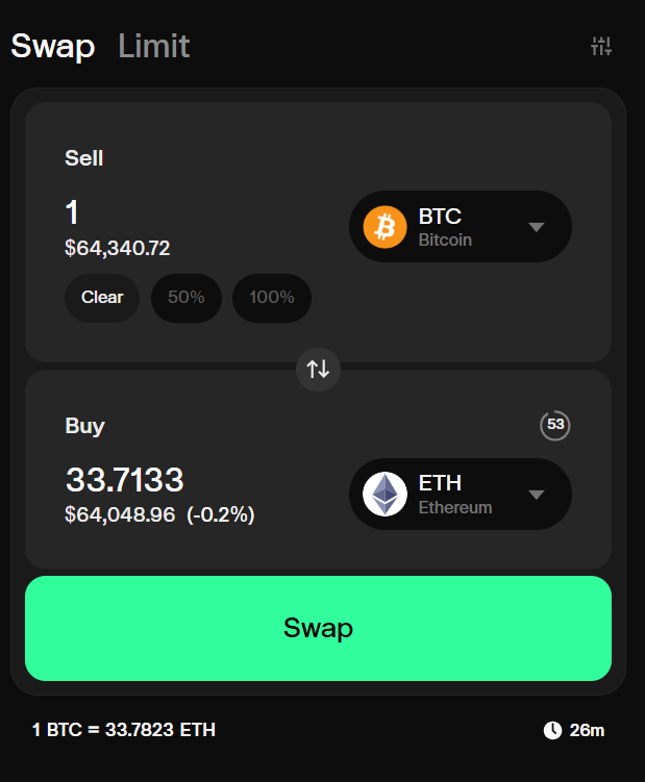
2- Select between Market Swap or Limit Swap, your Sell token & quantity, and the Buy token. The example below shows a swap of 1 BTC to ETH. Click “Swap”.
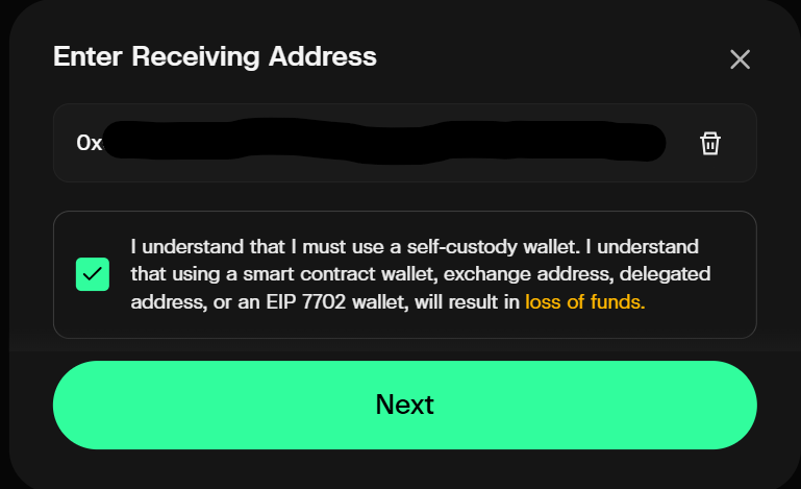
3- Enter your Receiving Address, read and acknowledge the warning notice carefully. Click “Next”.
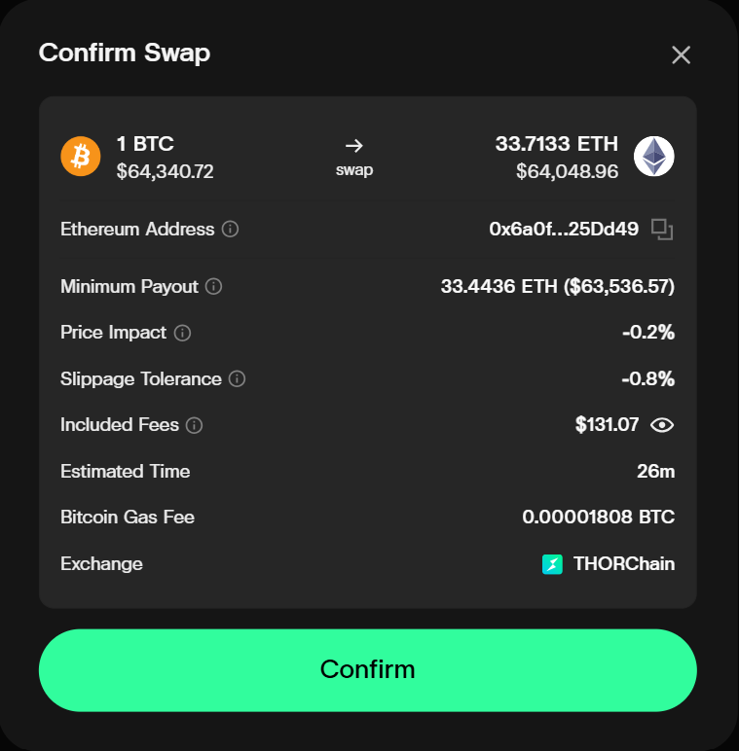
4- Check the details of the swap on the confirmation page. Click “Confirm”.
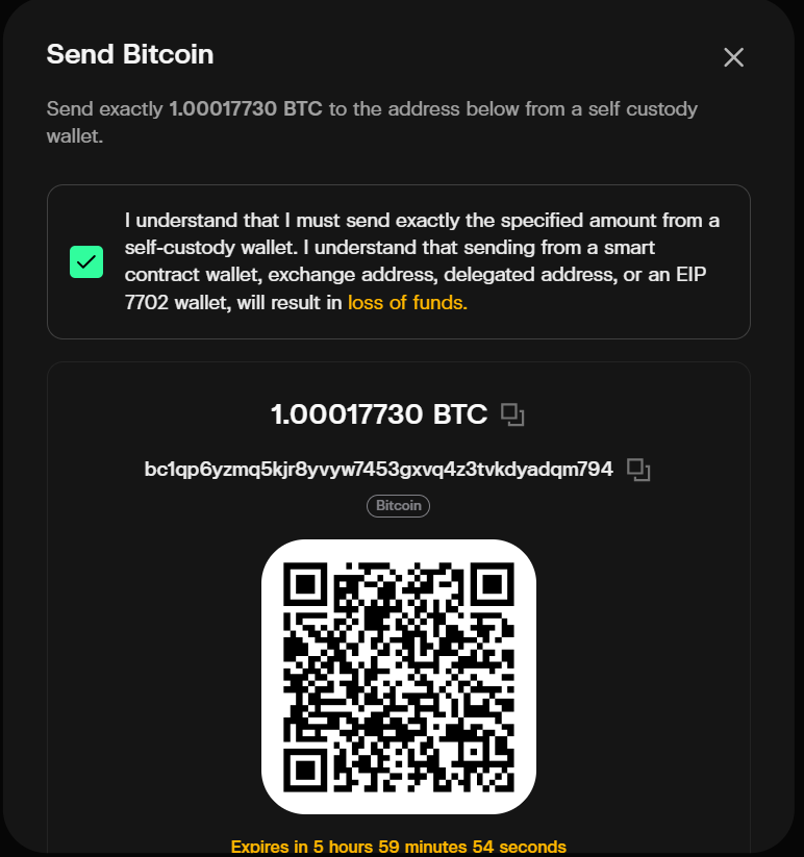
5- Read and acknowledge the deposit instructions carefully. Please follow the full instructions, including exact amount, type of sending wallet, deposit address and expiry.
Notes:
- For a fresh transaction, please repeat the steps to generate fresh instructions. The exact amount to deposit and the deposit address could be different every time.
- Currently, Walletless Swaps can only be used to swap from RUNE, THORChain Native/Secured Assets (e.g. TCY, RUJI, USDC on THORChain, etc.) and Gas Assets on chains connected to THORChain: AVAX, ETH on Base and Ethereum, BCH, BNB, BTC, DOGE, ATOM, LTC, SOL, TRX and XRP. More asset support (e.g. ERC-20s) will be available in the future.
- Walletless Swaps can be used to swap to any asset supported on https://swap.thorchain.org/.

Related articles
![THORChain's System Income distribution, with 20% now directed to Protocol-Owned Liquidity and the RUNE burn reduced to 1%.]()
Sep. 23, 2026
How THORChain’s New System Income Distribution Works
- Guide
![Illustration of THORChain's Protocol-Owned Liquidity system, showing System Income flowing into deeper liquidity pools.]()
Sep. 21, 2026
Why Protocol-Owned Liquidity Matters for THORChain
- Guide
![How to Swap Crypto on THORChain thumbnail, a THORChain guide]()
Sep. 18, 2026
How to Swap Crypto on THORChain
- Guide
![THORChain Thumbnail for the 2026 guide comparing ten decentralized exchanges across cross-chain support, fees and MEV protection.]()
Sep. 10, 2026
The 10 Best Decentralized Exchanges (DEXs) in 2026
- Guide
![Thumbnail for THORChain guide explaining how the Advanced Swap Queue and slip-based fees prevent sandwich attacks on swaps.]()
Sep. 7, 2026
How THORChain’s Swap Queue Prevents Sandwich Attacks
- Guide
![THORChain guide thumbnail explaining how to bond RUNE through direct whitelisting, RUNEBond and bRUNE liquid staking, with yield and risk comparisons for each method.]()
Sep. 2, 2026
How to Bond your Rune: a practical guide
- Guide
![THORChain is transparent even with privacy coins thumbnail.]()
Jul. 21, 2026
THORChain Is Transparent Even With Privacy Coins
- Guide
![THORChain Community Podcast #198 thumbnail featuring JP and Kenton demonstrating the first live decentralised RUNE to Monero swap on THORChain's chainnet.]()
May. 14, 2026
JP Demos Live Monero on THORChain: 7 Nodes, Real Funds, First Swap Works
- Podcast
- Guide
![]()
Apr. 22, 2026
How to read a transaction on THORChain?
- Guide
![]()
Apr. 16, 2026
THORChain’s Native API - plugging liquidity directly to wallets and DEXs
- Guide
![]()
Nov. 26, 2025
Memoless Transactions - THORChain Without Wallet Limitations
- Guide
![]()
Oct. 29, 2025
Advanced Swap Queue & Limit Swaps
- Guide
![]()
Oct. 2, 2025
THORChain Tokenomics (as of Oct 2025)
- Guide
![]()
Sep. 16, 2025
THORChain Core Protections: Security Architecture Validated
- Guide
![]()
Aug. 20, 2025
Enshrined Oracles: Giving THORChain Eyes on the Market
- Guide