How to Use THORChain's Bonding Interface: Bond, Unbond, Rebond, Yield & Track

— 10 min read
- Guide
THORChain's bonding interface allows RUNE holders to contribute bond to THORNode operators. Through five tabs, Bond, Unbond, Rebond, Yield, and Track, users can explore the bonding process, understand how their bond is managed, and monitor their position. This guide explains how to get started, what each feature does, and the important considerations before bonding RUNE.
Key Takeaways
- Bonding RUNE requires prior whitelisting by the node operator. Unbonding is only possible after the node exits the active validator set and shows Standby status.
- Rebond changes the wallet associated with an existing bond on the same node, without first unbonding.
- Yield: choose how much of your bond rewards is paid out at each churn instead of being rebonded.
- Track can show public bonded positions, including bond, reward, APR, yield, node status and operator fee.
- Risks: Bonded RUNE may be subject to slashing, and withdrawals can depend on the node's status and churn process. See the FAQ section below for more information.
Before You Begin
You'll need a compatible THORChain wallet, enough native RUNE for any action that requires a transaction and its network fee, and the correct node address you're bonding to.
Connect Your Wallet
- Open bond.thorchain.org and select Connect THORChain Wallet.
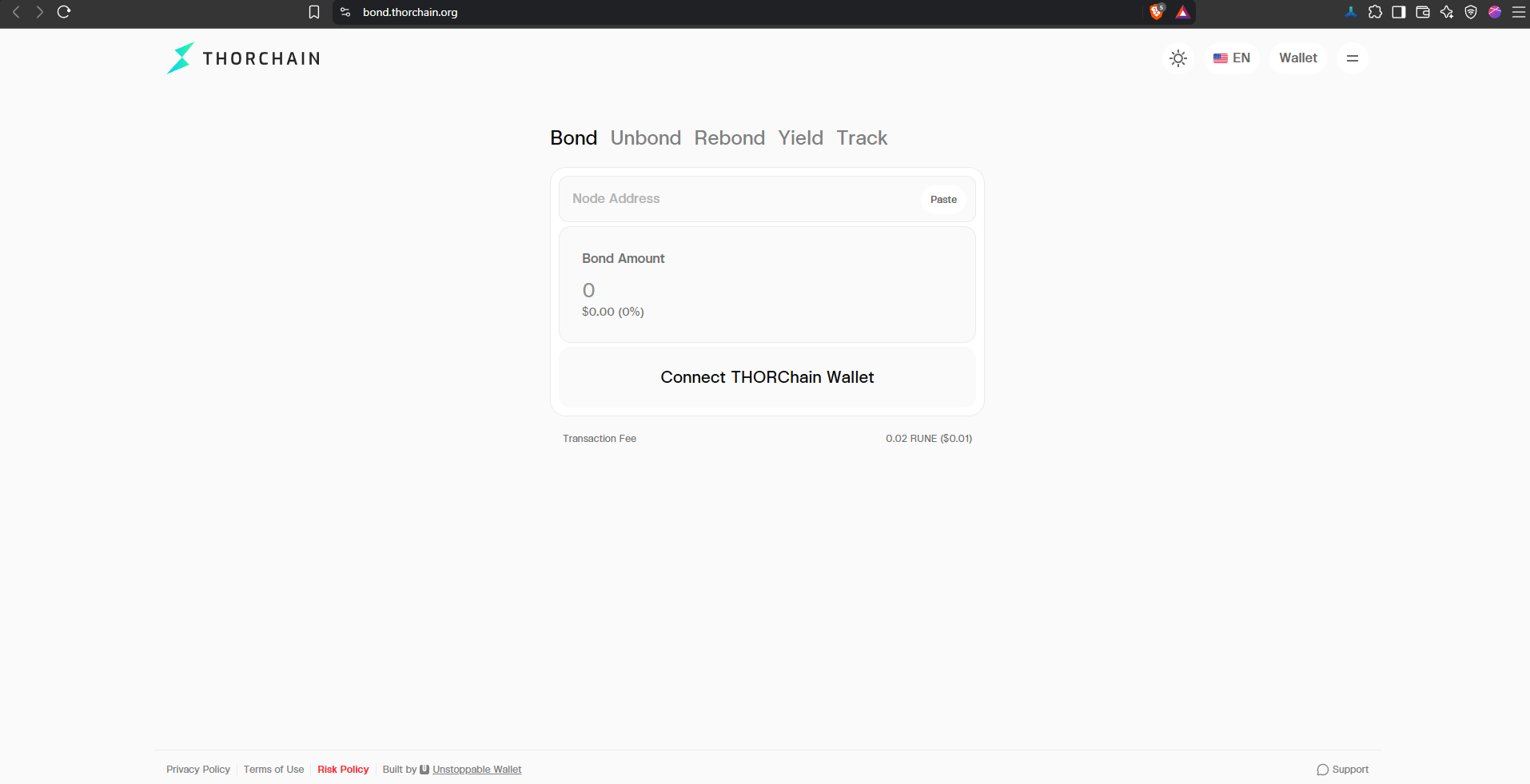
- In the Connect Wallet dialog, make sure THORChain is selected under Chains. Then choose an available compatible method.
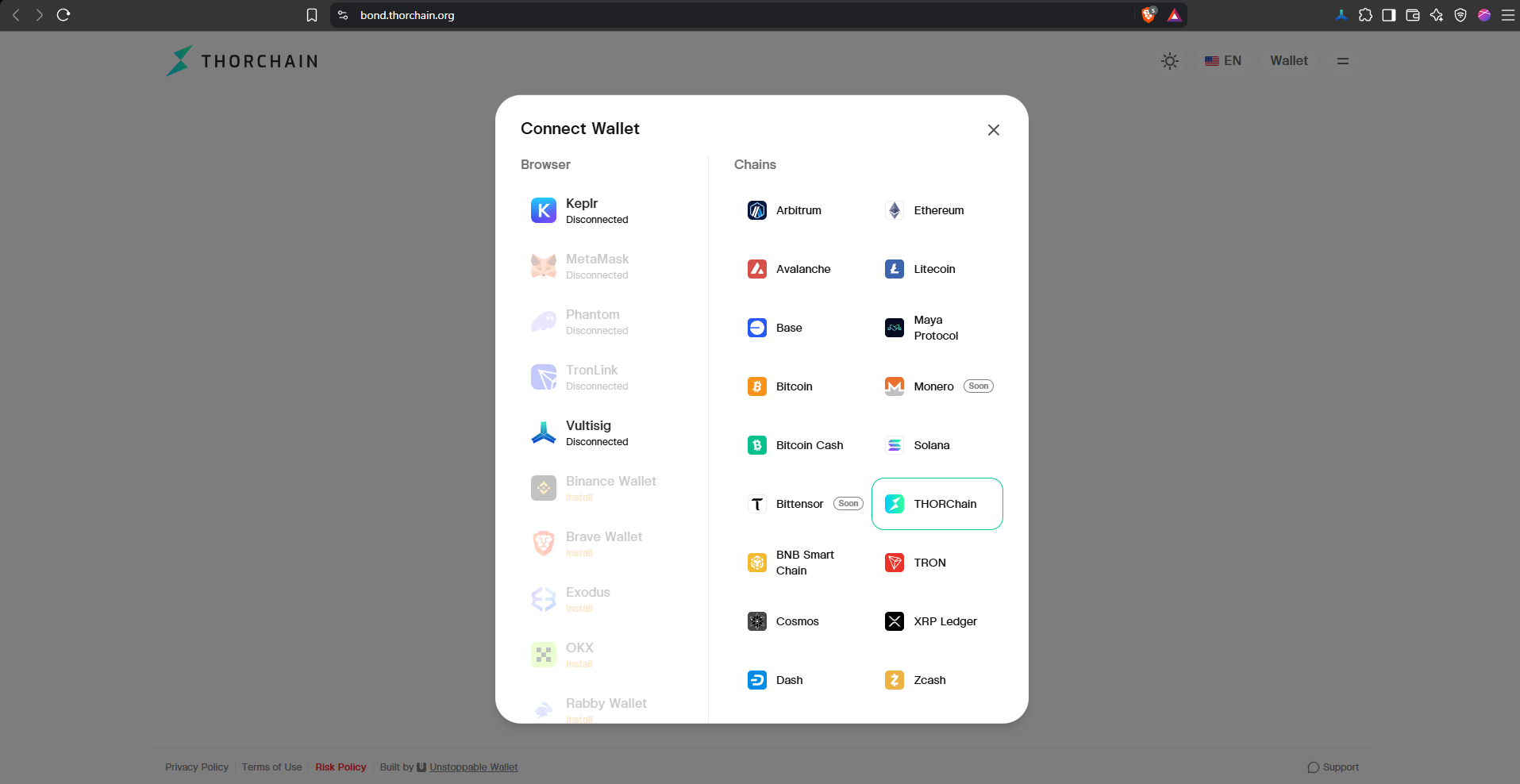
- Follow the prompts in your wallet to connect. For this walkthrough, we used WalletConnect.
Remember: Never share your recovery phrase or private keys.
Before bonding: Contact your chosen THORNode operator and ask them to whitelist your THORChain wallet address. Whitelisting is mandatory: the network will reject a bond from an address the operator hasn't approved. Independently verify the node address before proceeding.
1. Bond: Add RUNE to a Node
Use the Bond tab when you want to contribute RUNE to a THORNode's bond.
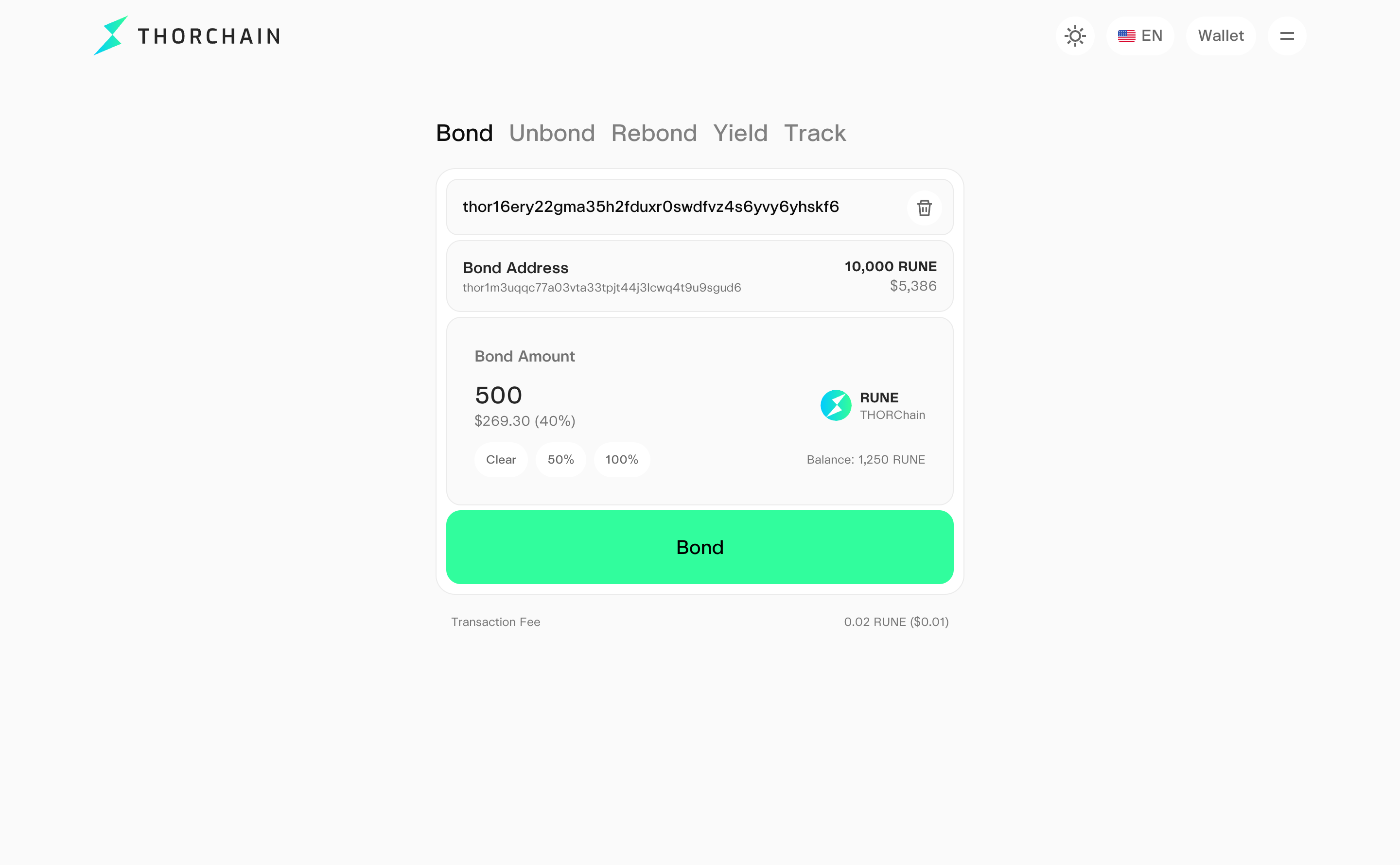
- Select Bond in the top navigation.
- Connect your THORChain wallet if it isn't connected already.
- Enter the intended THORNode address in the Node Address field.
- Verify the node address and the displayed Bond Address (your connected wallet), then enter the RUNE amount you want to contribute. The interface also shows your wallet balance and amount shortcuts such as Clear, 50%, and 100% when applicable.
- Enter the amount and confirm that the operator has whitelisted your wallet address. Review the fixed 0.02 RUNE network fee, then select “Bond”. Verify the transaction details in your connected wallet before signing.
How Bonding Works in Practice
Before bonding RUNE, you'll need to coordinate with a THORNode operator.
- Contact an operator: Ask about their fee, how they manage the node, their churn-out and unbonding process, and where they share updates.
- Discuss your plans: The operator may ask how much RUNE you intend to bond and for how long.
- Get whitelisted: Share your thor1... wallet address and wait for the operator to confirm approval.
- Bond through the interface: Use the Bond tab to submit the transaction from your whitelisted wallet.
- Add more RUNE later: You can generally top up from the same whitelisted address without requesting approval again, provided bonding is enabled.
Important: Bonding is not a normal send transaction. Never send RUNE directly to a node address.
Where Do You Find a Node Address?
Obtain the node address directly from your chosen THORNode operator and independently verify it before bonding. For guidance on finding operators and understanding bonding risks, see the official Bond RUNE page: thorchain.org/bond-rune.
2. Unbond: Request to Withdraw Bonded RUNE
Use Unbond to withdraw RUNE from an existing bond after the node has churned out of the active validator set. Before proceeding, open Track and confirm that the node shows “Standby”. The Unbond button may become available while a node is still active, but the network will reject the transaction. Coordinate withdrawal expectations with your node operator.
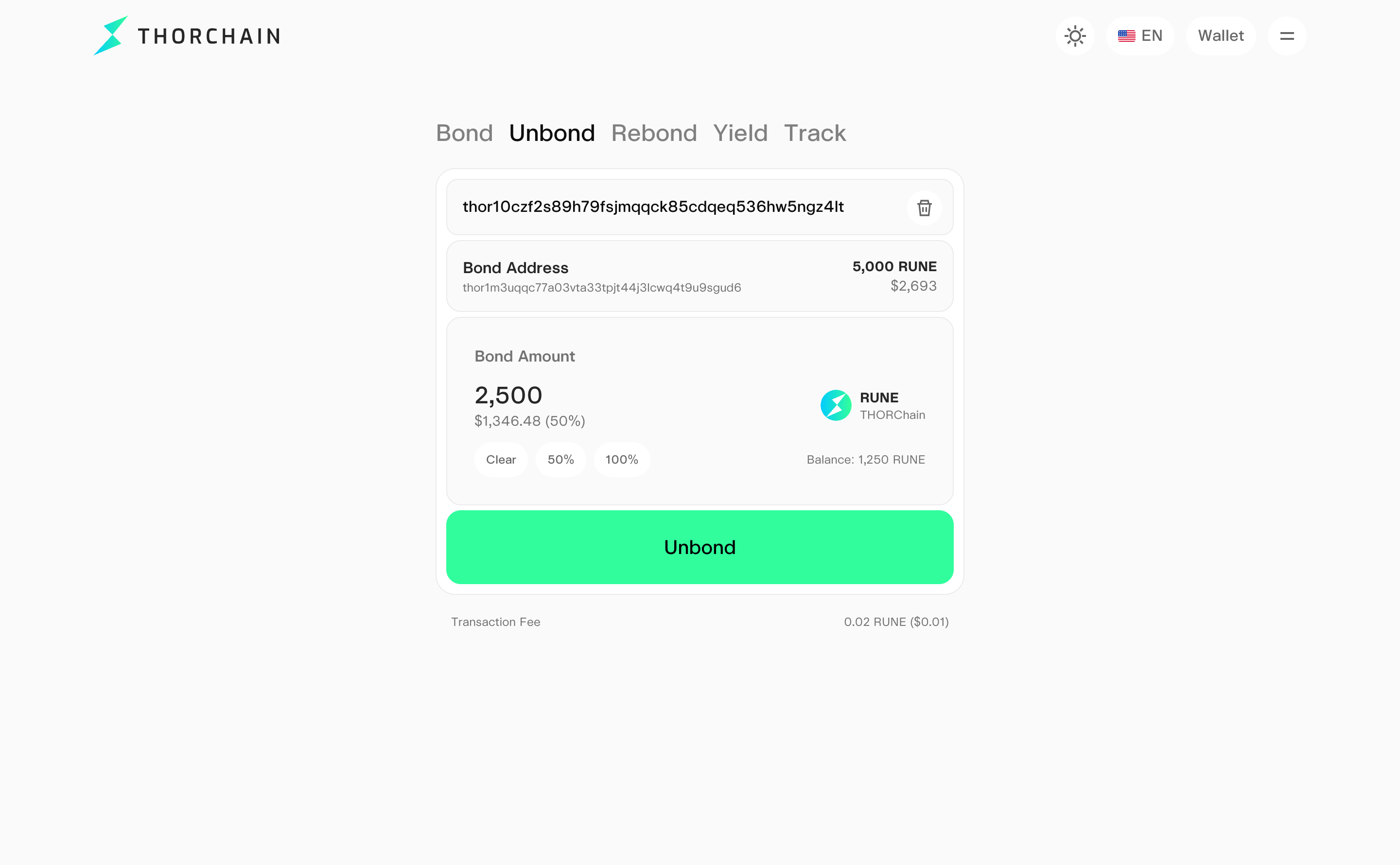
- Select the Unbond tab.
- Enter or confirm the relevant node address. The interface displays the Bond Address, bonded RUNE amount, Unbond amount field, and fixed 0.02 RUNE network fee.
- Once the node shows “Standby” in Track and your bonded position is eligible for withdrawal, enter the amount you want to unbond. Review the details before submitting.
- Confirm the details in your connected wallet before signing.
3. Rebond: Move a Bond to Another Wallet on the Same Node
Rebond is particularly useful when you want to change the wallet address associated with an existing bond without first unbonding from the node.
It does not mean transferring the bond to a different node. This is a same-node wallet migration that avoids waiting for a node churn, provided the new wallet address is whitelisted by the operator.
For example, if you want to migrate from an older wallet to a new wallet while continuing to bond to the same operator, Rebond may let you move the position directly rather than withdrawing and bonding again.
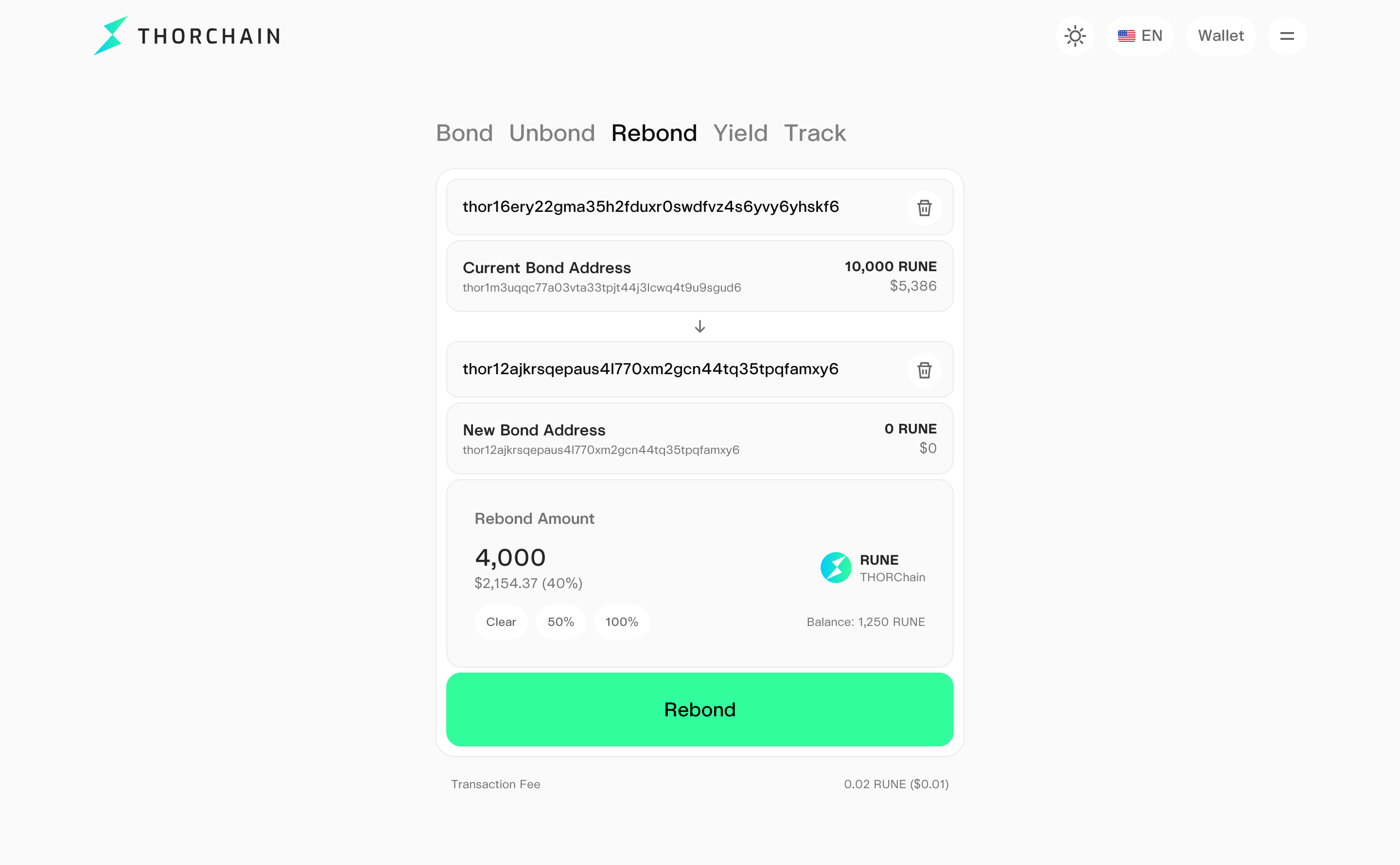
- Open Rebond tab, confirm the node address and Current Bond Address.
- Enter the new destination in the “New Wallet Address” field.
- Review Rebond Amount. Note: Entering 0 will move 100% of your bond. Verify the desired amount and destination carefully.
- Review the transaction details and fee, then submit and confirm in the connected wallet.
4. Yield: Get Part of Your Rewards Paid Out
By default, your bond rewards are added to your bond at each churn and keep compounding. The Yield tab sets up Bond Yield: you choose a share of your future rewards to be paid out at each churn, and the rest keeps compounding.
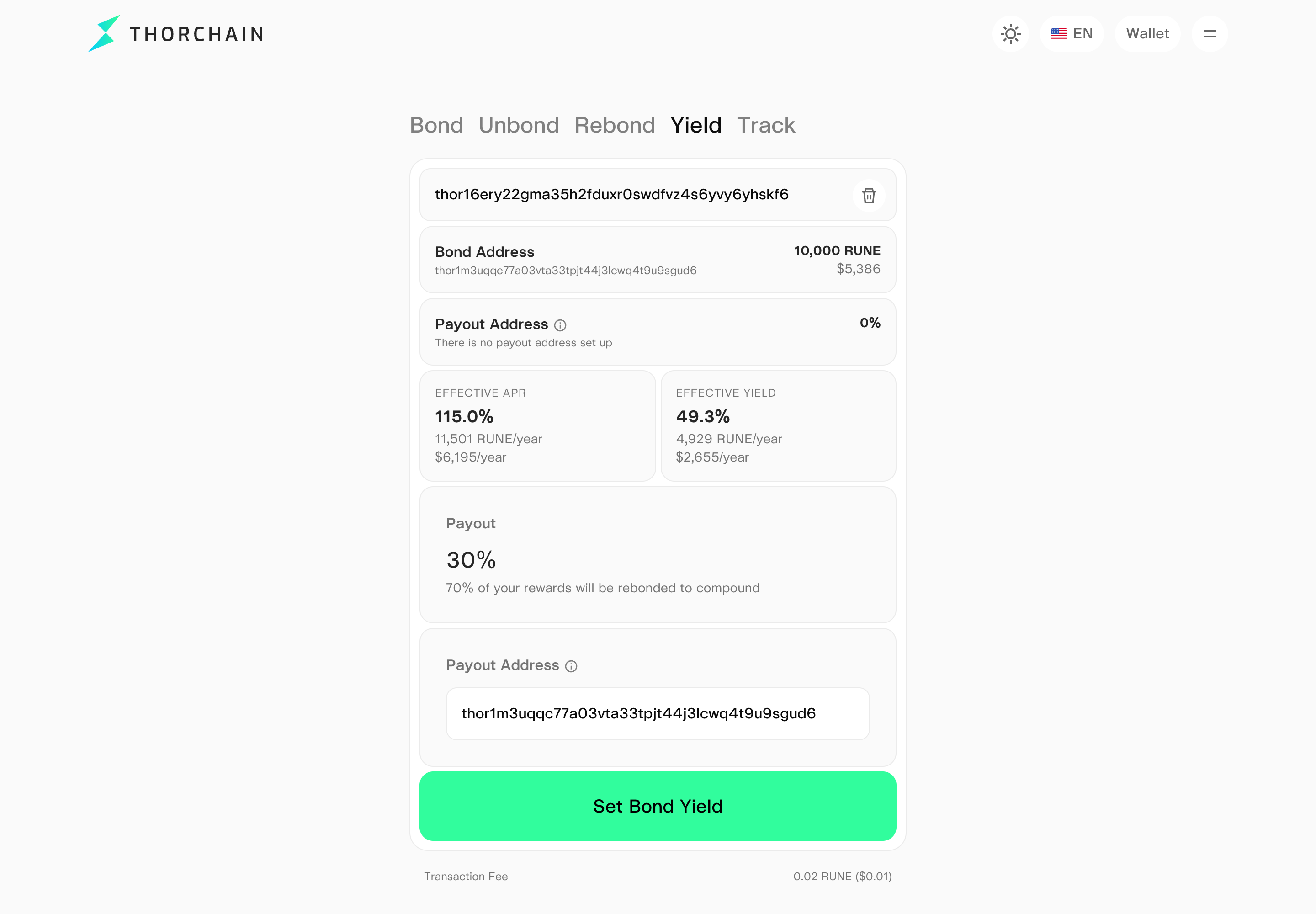
- Open the Yield tab and confirm the node address. The tab shows your bond, your current payout settings, and your effective APR and yield.
- Enter the Payout %. The interface shows how much will be rebonded, e.g. "70% of your rewards will be rebonded to compound". 0% turns Bond Yield off and clears the payout address.
- Optionally, enter a Payout Address: a RUNE address or a THORName you own. Leave it empty to be paid to your own address. To receive BTC or a stablecoin, use a THORName with that asset set as its preferred asset.
- Select Set Bond Yield and confirm in your wallet.
Payouts happen at each churn, after the operator's fee, not continuously. If a payout fails, that amount goes back into your bond.
5. Track: Look Up Bonded Positions
Use Track to look up bonding information for a THORChain address, including a public address with an existing bond. This tab displays a dashboard with the bond amount, next reward, effective APR, effective yield, and a node-level breakdown. These figures describe that position at the time viewed, not guaranteed future returns.
Note: Track does not require a wallet connection. You can look up public bonded positions by entering a THORChain address. Bond information can also be monitored through third-party interfaces such as boone.tools/thorfolio.
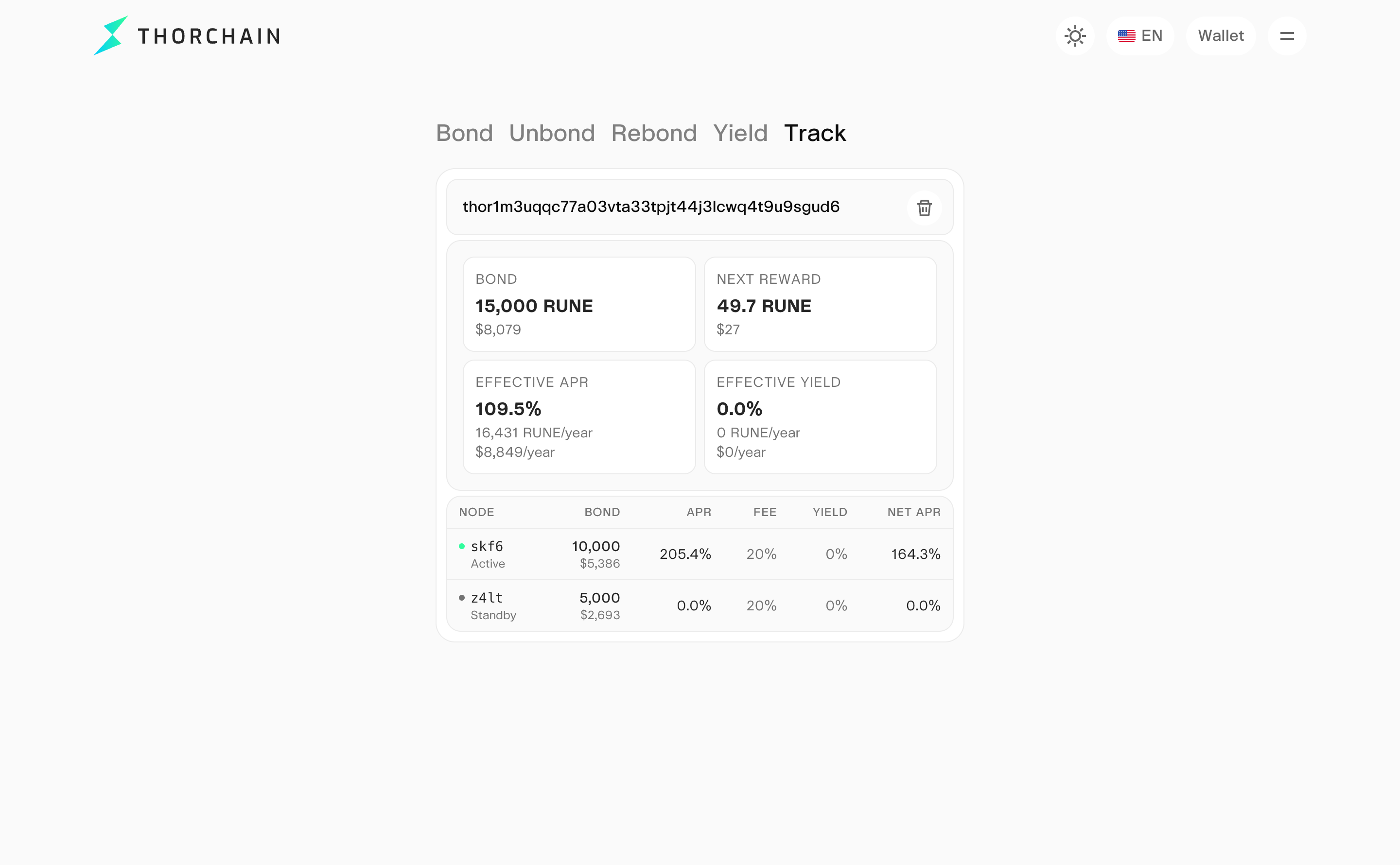
- Open Track.
- Enter the THORChain address whose bond position you want to inspect.
- Review the dashboard showing the information associated with the input address.
Bonding Safety Checklist
Before bonding, verify the official website, node address, operator identity, and confirmation that your wallet address has been whitelisted. Review the RUNE amount and fixed 0.02 RUNE network fee before signing. Never send RUNE directly to a node address.
Before unbonding, confirm the node shows “Standby” in Track. For Rebond, carefully verify the destination wallet address. Understand slashing risks, operator fees, and withdrawal conditions. Never share your recovery phrase or private keys.
Other Bond Monitoring Tools
Use these explorers to monitor your RUNE bonded to one or more nodes.
- THORChain Explorer: thorchain.net/nodes
- RUNE.TOOLS: rune.tools/bond
- RUNEScan: runescan.io
- ViewBlock: viewblock.io/thorchain
Frequently Asked Questions
Can I bond to any node address?
No. Your THORChain wallet address must first be whitelisted by the operator of the node you want to support. Contact the operator, confirm approval, and independently verify the node address before bonding.
Is Rebond the same as Unbond?
No. Unbond requests withdrawal from a bond, while Rebond is intended to move an existing bond to a different wallet address on the same node without first unbonding.
Does entering 0 in Rebond mean nothing will move?
No. The current Rebond interface explicitly states that entering 0 moves 100% of the bond. Check the latest interface and confirm the intended action before signing.
Can I withdraw whenever I want?
No. Bonded RUNE can only be unbonded after the node has churned out of the active validator set. Check that its status shows “Standby” in Track before attempting to withdraw. Coordinate exit expectations with your node operator.
What fees do node operators charge to bond my RUNE?
Node operators take a percentage of the rewards their node generates. Node operators set their own rates so confirm the fee with your node operator before bonding. The typical fee is 20%. Nothing is taken from your bond principal, only from the yield generated by the node.
What is the expected APR?
Current annualized APR is available on the Nodes tab in THORChain Explorer. The yield is variable as it depends on network fees, which fluctuate with trading volume.
When do I receive my yield?
Rewards are distributed at each churn, approximately every three days. By default, rewards are added to your bond and continue compounding. With Bond Yield, you can choose to receive part or all of your rewards at each churn without unbonding. Any rewards remaining in your bond stay locked until the node churns out.
How often do nodes churn?
A churn occurs approximately every three days. The oldest and worst-performing nodes are removed at each churn. The lowest-bond node is also removed when the active set is full at 120 nodes. Nodes running outdated software are also churned out. Additionally, two-thirds of active nodes can vote to force out a node they believe is unresponsive or acting against the network's interests.
What are slash points?
Slash points are penalties assigned when a node is slow to observe or validate transactions. This is typically due to hardware, connectivity, or power issues. They reduce the node's yield during that churn period and reset after every churn. Your bond principal is not at risk from these slash points, only the rewards accumulated during the affected period.
What are the risks of bonding RUNE to a node?
There are several risks to understand before bonding:
- Illiquidity: Your bonded RUNE remains locked while the node is active, potentially across many churn cycles. Once the operator requests to leave, the node normally exits at the next churn, subject to network conditions. You can only unbond after the node has exited the active set.
- Reduced yield from poor performance: A node accumulating slash points may earn fewer rewards, reducing your effective APR. Slash points affect rewards, while separate slashing events can put bonded principal at risk.
- Uncooperative node operator: An operator can refuse to churn out on request, or raise their fee without your consent. In either case, your options are limited to the node exiting naturally or being voted out.
- Node operator collusion: In the most extreme scenario, a group of node operators could collude to steal from the network. This would put bond principal at risk and cause a collapse in RUNE's price, affecting everyone in the ecosystem, not just those bonded to the colluding nodes. For this reason, bond providers should have some kind of legal or social relationship with their node operator. It's fine to remain anonymous to the broader network, but you and your operator should not be strangers to each other.
Official Resources
- THORChain bonding interface: bond.thorchain.org
- THORChain Bond RUNE overview page (primary reference): thorchain.org/bond-rune

Related articles
![THORChain ADR cover reading "ADR 029, Bond Yield" in mint green, next to three stacked isometric layers glowing on a black panel, with the THORChain logo at the top left.]()
Nov. 13, 2026
ADR-029 - Streaming Yield for Bond Providers
- Guide
![THORChain cover with "Private Swaps" in a cyan-to-green gradient, "Powered by Houdini" and "Now live on swap.thorchain.org", next to the purple Houdini logo in a gradient ring on a dark background.]()
Oct. 30, 2026
Private Swaps and Sends are Live on swap.thorchain.org, Powered by Houdini
- Guide
![How to get TCY on THORChain: A Step-by-Step Guide.]()
Oct. 27, 2026
How to Get TCY on THORChain: A Step-by-Step Guide
- Guide
![A mint green notification bell glyph on a black key, cover of THORChain's guide to its official channels, podcasts and social media.]()
Oct. 9, 2026
How to Stay Up to Date With THORChain
- Guide
![Zcash (ZEC) logo alongside the THORChain logo, illustrating native ZEC swaps across blockchains on THORChain.]()
Oct. 7, 2026
Bringing Native Zcash to THORChain
- Guide
![boone.tools logo on a dark THORChain background, introducing Boone's collection of THORChain analytics dashboards.]()
Oct. 5, 2026
Introducing boone.tools: A Better Way to Understand THORChain
- Spotlight
- Guide
![THORChain's System Income distribution, with 20% now directed to Protocol-Owned Liquidity and the RUNE burn reduced to 1%.]()
Sep. 23, 2026
How THORChain’s New System Income Distribution Works
- Guide
![Illustration of THORChain's Protocol-Owned Liquidity system, showing System Income flowing into deeper liquidity pools.]()
Sep. 21, 2026
Why Protocol-Owned Liquidity Matters for THORChain
- Guide
![How to Swap Crypto on THORChain thumbnail, a THORChain guide]()
Sep. 18, 2026
How to Swap Crypto on THORChain
- Guide
![THORChain Thumbnail for the 2026 guide comparing ten decentralized exchanges across cross-chain support, fees and MEV protection.]()
Sep. 10, 2026
The 10 Best Decentralized Exchanges (DEXs) in 2026
- Guide
![Thumbnail for THORChain guide explaining how the Advanced Swap Queue and slip-based fees prevent sandwich attacks on swaps.]()
Sep. 7, 2026
How THORChain’s Swap Queue Prevents Sandwich Attacks
- Guide
![THORChain guide thumbnail explaining how to bond RUNE through direct whitelisting, RUNEBond and bRUNE liquid staking, with yield and risk comparisons for each method.]()
Sep. 2, 2026
How to Bond your Rune: a practical guide
- Guide
![THORChain guide thumbnail showing how to perform a cross-chain swap without connecting a wallet, using the Walletless Swap feature on swap.thorchain.org.]()
Aug. 12, 2026
How To: Walletless Swaps
- Guide
![THORChain is transparent even with privacy coins thumbnail.]()
Jul. 21, 2026
THORChain Is Transparent Even With Privacy Coins
- Guide
![THORChain Community Podcast #198 thumbnail featuring JP and Kenton demonstrating the first live decentralised RUNE to Monero swap on THORChain's chainnet.]()
May. 14, 2026
JP Demos Live Monero on THORChain: 7 Nodes, Real Funds, First Swap Works
- Podcast
- Guide